


If you’ve received an in-app message from “Signal Support” warning about state-sponsored hackers, a mandatory two-factor rollout, or an urgent “sync issue” putting your messages at risk, stop. Don’t follow the instructions. Block the sender.
On June 26, 2026, the FBI and CISA published an update to a March 2026 advisory (PSA I-032026-PSA, updated as I-062626-PSA) confirming that Russian Intelligence Services (RIS) actors, publicly tracked as UNC5792 and UNC4221 and tied to FSB officers embedded with the FSB Border Guards and Russian military-linked hacking units, have shifted their Signal phishing campaign from stealing verification codes to stealing Backup Recovery Keys. The State Department’s Rewards for Justice program is now offering up to $10 million for information on UNC5792 operatives, which tells you how seriously this is being treated. The campaign started against high-value targets: government officials, military personnel, journalists, and Ukrainian officials. It’s now showing up against founders, VCs, and corporate accounts too.
Why does this matter more than earlier Signal phishing
Encryption was never the weak point here. Signal’s end-to-end encryption is intact; nobody is cracking it. The Backup Recovery Key is a 64-digit string that decrypts a local or cloud backup of your entire message history. Hand that over, and an attacker doesn’t need to compromise the app. They just restore your backup onto their own device and read everything: past conversations, group chats, media, all of it.
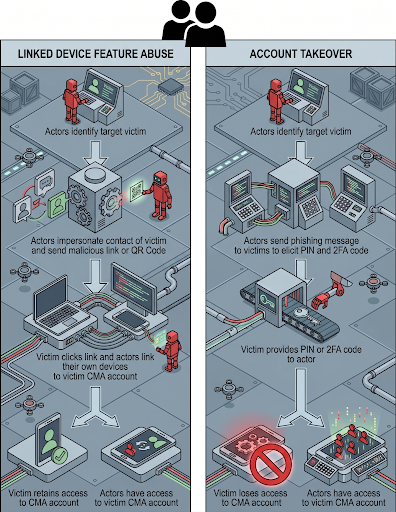
Earlier waves of this campaign asked for SMS codes or PINs, or abused Signal’s linked device feature. Recovery-key theft is a different order of problem because it reaches backward. A stolen verification code gets you into an account going forward. A stolen recovery key gets you into everything that account has ever said.
There’s also a persistence detail most coverage of this campaign has glossed over. If a victim’s key is compromised and they later delete the account and register a new one on the same phone number, the old key is still valid against the new account. Regenerating the key breaks that link, but only going forward, and only if the victim knows to do it.
How the scam is actually run

The attackers work in two messages, both sent as in-app direct messages with an avatar and display name spoofing “Signal Support.”
Message one manufactures urgency: a joint investigation with the US government and European partners has supposedly found account attacks from hackers in Iran and post-Soviet countries, and Signal is rolling out mandatory two-factor verification in response.
Message two follows shortly after and escalates the crisis: your account data, messages, and media are at risk of permanent loss due to a “sync issue.” This one comes with step-by-step instructions: open Settings, enable Backups, view the Recovery Key, copy it, paste it into the chat.
Both messages are written to look procedurally correct. They reference real Signal menu paths and real feature names. That’s what makes them work. The FBI advisory published the phishing text verbatim specifically because the wording is convincing enough that reading about it in the abstract doesn’t prepare you to recognize it in your own inbox.
The part of the generic phishing advice misses
Most brand protection and takedown workflows are built around a domain: register a lookalike URL, host a fake login page, get it flagged, file abuse reports with the registrar and host, and get it pulled. That pipeline doesn’t exist here. There’s no domain, no hosting provider, no DNS record. The entire attack lives inside Signal’s own messaging layer, sent from an account that looks like any other Signal user.
That means the remediation path is different in kind, not just in speed. Reporting has to go through the platform’s own trust and safety channel, and for anything tied to a confirmed state-sponsored cluster, through IC3 and CISA, not through a registrar abuse mailbox. Security teams evaluating monitoring coverage should check specifically whether their current tooling extends to in-app messaging abuse on CMAs, or whether it’s scoped to web and domain infrastructure only. For most organizations right now, it’s the latter, which is exactly the gap this campaign is exploiting.
What to do right now
-
Never share your Backup Recovery Key with anyone, in any context. Treat it like your bank card PIN. It’s not something legitimate support will ever ask you to paste into a chat.
-
Signal support does not message you in-app. Legitimate contact from Signal comes through official email channels, not a DM from an account calling itself “Signal Support.”
-
No legitimate support request will ask for a verification code or recovery key. If a message asks for either, it’s hostile, regardless of how urgent or official it sounds.
-
If you’ve already shared your key, generate a new Backup Recovery Key immediately from Settings, ideally from a device you’re confident isn’t compromised. This invalidates the old key for future backups, and anything an attacker has already downloaded before you rotate the key is gone. Rotating doesn’t undo that.
-
Report it. File with IC3 (ic3.gov), your local FBI field office, or CISA (report@cisa.gov / 1-844-Say-CISA). Corporate users should also loop in their internal security or IT team so the incident is tracked at the org level, not just at the individual account level.

FAQ
What is the Signal recovery key phishing scam?
Does this break Signal's encryption?
How do I know if a "Signal Support" message is fake?
What if I already pasted my recovery key into the chat?
This campaign shows the gap in domain-only monitoring
State-sponsored actors are proving that account takeover doesn’t need a fake domain, a phishing kit, or a single piece of infrastructure you can send to a registrar. It needs one convincing message inside a platform your monitoring may not cover at all.
PhishFort’s AI-native phishing detection is built to catch this kind of in-app and platform-native impersonation, not just lookalike domains and fake login pages. If your current coverage stops at web and DNS, talk to us about closing that gap before it gets tested on your team.
Related content
- Modern Phishing Techniques
- Executive Monitoring
- Phishing-as-a-Service: PhaaS Kits Used to Target Microsoft 365 Credentials
- Fake Login Pages
This overview draws on the FBI/CISA joint advisory (PSA I-062626-PSA, June 26, 2026) and PhishFort’s operational perspective on takedown and abuse-response workflows for in-app messaging threats, which sit outside traditional domain-based brand protection coverage.


